Norton NeoGen
|
||||||
About
Norton Neo is described as the first safe AI-native browser, combining traditional web browsing with built-in AI assistance and strong privacy and security protections. The browser stores chat and browsing history locally, so your data stays under your control, and lets you decide what to remember and what to forget, or disable memory entirely. It embeds a unified AI “Magic Box” that merges search, chat, and commands: you can ask it for summaries, help with research, or quick actions without needing to switch tools. Neo includes automatic tab management, grouping tabs by topic to reduce clutter, and offers built-in protections against malicious or phishing sites via its Web Shield security layer. With ad-blocking, phishing detection, and the AI features integrated directly into the browser (not as external extensions), Neo aims to make web browsing faster, more efficient, and safer.
|
About
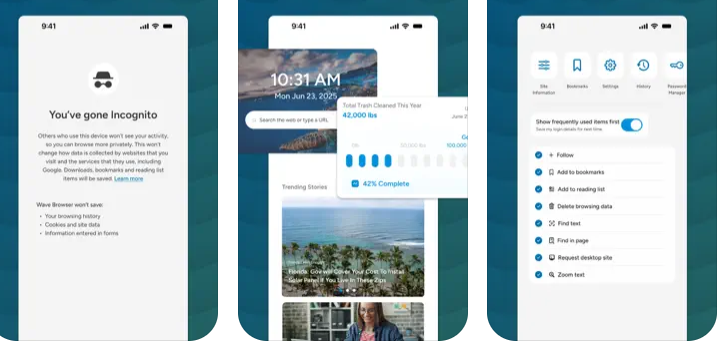
Wave Browser is an efficient, eco-conscious browser that creates a cleaner, more organized, and more meaningful online experience while helping remove ocean plastic through its partnership with 4ocean.
Built on the trusted Chromium foundation, Wave Browser brings essential tools directly into the browser so you can work, study, and explore without extra extensions or switching apps. The sidebar keeps your favorite tools within reach, and split view lets you work across two pages at once for effortless research and multitasking.
Wave Browser brings together helpful built-in tools that make everyday browsing simpler, keeping you organized, speeding up tasks, and supporting your workflow with features like reading tools, trackers, quick-access messaging, and an AI assistant. If you want efficient built-in tools and a simple way to make a positive impact, Wave Browser aligns with your values.
Surf the web. Save the ocean. Make every tab count.
|
|||||
Platforms Supported
Windows
Mac
Linux
Cloud
On-Premises
iPhone
iPad
Android
Chromebook
|
Platforms Supported
Windows
Mac
Linux
Cloud
On-Premises
iPhone
iPad
Android
Chromebook
|
|||||
Audience
Web users wanting a browser that uses AI to save time on browsing, summarizing content, organising tabs, and protecting against online threats
|
Audience
Individuals interested in a web browser optimized for speed, productivity and environmental impact
|
|||||
Support
Phone Support
24/7 Live Support
Online
|
Support
Phone Support
24/7 Live Support
Online
|
|||||
API
Offers API
|
API
Offers API
|
|||||
Screenshots and Videos |
Screenshots and Videos |
|||||
Pricing
No information available.
Free Version
Free Trial
|
Pricing
Free
Free Version
Free Trial
|
|||||
Reviews/
|
Reviews/
|
|||||
Training
Documentation
Webinars
Live Online
In Person
|
Training
Documentation
Webinars
Live Online
In Person
|
|||||
Company InformationGen
United States
neobrowser.ai/
|
Company InformationWave Browser
Cayman Islands
wavebrowser.co
|
|||||
Alternatives |
Alternatives |
|||||
|
|
||||||
|
|
|
|||||
|
|
|
|||||
|
|
|
|||||
Categories |
CategoriesWave Browser includes a powerful, free built-in ad blocker that removes intrusive ads, pop-ups, and hidden trackers to create a faster, cleaner, and safer browsing experience. By stopping most unwanted scripts before they load, Wave Browser improves page speed and reduces the risk of malicious activity. Its thoughtful design and smooth interface make browsing feel effortless, while privacy features and security protections help keep your browsing safe. Wave Browser is built to help you move confidently across the web with less noise and greater control. Wave Browser is built for productivity, combining essential tools with a clean, uncluttered design that helps you stay focused throughout your day. With features like a reading list, bookmarks, price tracking, package tracking, and a versatile converter tool, Wave Browser keeps everything organized without the need for extra apps. The convenient sidebar gives you quick access to tools and apps, while split view lets you work across two pages at once, perfect for studying, researching, comparing, or multitasking efficiently. Wave’s smooth interface creates a workspace that feels natural and streamlined, making it easier to move between tasks. And because each user contributes to verified ocean cleanup, your productivity has purpose, turning everyday browsing into real-world impact. Wave Browser is an efficient, modern web browser built on Chromium and designed for clarity, safety, and productivity. Its built-in tools and extensions help you work, study, and game with ease, while privacy features and strong security protections keep your browsing safe. Wave’s clean, ocean-inspired interface feels intuitive and comfortable for everyday use. Whether you're researching, creating, or exploring the web, Wave Browser delivers fast, reliable performance in a streamlined experience that stays out of your way. And because every user supports verified ocean cleanup, Wave becomes more than just a browser, it turns each session into a meaningful contribution toward a cleaner planet. |
|||||
Integrations
Amazon
Chromium
Facebook Messenger
GPT-5
Google Chrome
Instagram
JavaScript
WhatsApp
|
Integrations
Amazon
Chromium
Facebook Messenger
GPT-5
Google Chrome
Instagram
JavaScript
WhatsApp
|
|||||
|
|